Posts

Showing posts with the label C#

Get Credit Card Type

How to get C-card type, how to know the input card number is Visa or Master Card ? here the code for CreditCard.cs public class CreditCard { private string AmericanExpressPattern => @"^3[47][0-9]{13}$"; private string MasterCardPattern => @"^5[1-5][0-9]{14}$"; private string VisaCardPattern => @"^4[0-9]{12}(?:[0-9]{3})?$"; private string DinersClubCardPattern => @"^3(?:0[0-5]|[68][0-9])[0-9]{11}$"; private string EnRouteCardPattern => @"^(2014|2149)"; private string DiscoverCardPattern => @"^6(?:011|5[0-9]{2})[0-9]{12}$"; private string JcbCardPattern => @"^(?:2131|1800|35\d{3})\d{11}$"; private Dictionary CreditRegxs { get; set; } public CreditCard() { CreditRegxs = new Dictionary () { {"American Express",AmericanExpressPattern}, {"Mastercard",MasterCardPattern}, {"Visa...
Serialization File Error Could not load file or assembly mscorlib.XmlSerializers

When serializing an XML file, an error occurs in the following manner: XmlSerializer serializer= new XmlSerializer(typeof(MyType)); Errors such as : The assembly with display name 'mscorlib.XmlSerializers' failed to load in the 'LoadFrom' binding context of the AppDomain with ID 1. The cause of the failure was: System.IO.FileNotFoundException: Could not load file or assembly 'mscorlib.XmlSerializers, Version=4.0.0.0, Culture=neutral, PublicKeyToken=b77a5c561934e089' or one of its dependencies. The system cannot find the file specified. use the following line to solve it:  XmlSerializer lizer = XmlSerializer.FromTypes(new[] { typeof(MyType) })[0];

Error "The operation can not be performed Because the message Has Been changed"

Being of the email changes saved, then the execution of the mail Save () method, you may experience the error   "The operation can not be performed Because the message Has Been changed."  Especially if you go to edit multiple email. This is due to the object  Microsoft.Office.Interop.Outlook.UserProperty  that was not released.   So before the save is to be performed education System.Runtime.InteropServices.Marshal.ReleaseComObject (UserProperty). At this stage the previous post snippet becomes   public void AddCustomPropertyToMail (entryID string, string propertyName, string value) { Microsoft.Office.Interop.Outlook.MailItem mail = Globals.ThisAddIn.Application.Session.GetItemFromID (entryID) as Microsoft.Office.Interop.Outlook.MailItem; if (email! = Null) { Microsoft.Office.Interop.Outlook.UserProperty UserProperty = mail.UserProperties.Add (propertyName, Microsoft.Office.Interop.Outlook.OlUserPropertyType.olText); UserProperty.Val...

OCR text detection with google APIs C#

Image
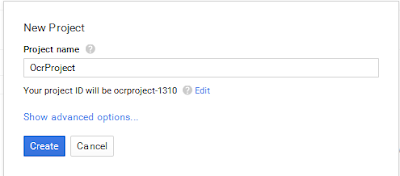
After searching more than 3 hrs to know how to implement text detection using google API i decided to write this post, hope it help c# developer to know how to use and implement Vision API, Source Code :  https://github.com/msm2020/OCR-google-APIs 1- Create server key on google console Go to http://console.developers.google.com/ and create new project or use existing project From Overview page enable vision API You need to create new bill information to use vision API, it's fully free for 1st 1000 request/ month you can check https://cloud.google.com/vision/docs/pricing After Enable Google Cloud Vision API go to Credentials page and create new server key Create key by fill all requested data and download Json file 2- Create Visual studio project I'll use vs 2015 and .NET framework 4.5 Add google Nuget packages : Google.Apis.Vision.v1 by right click on project and then manage nuget ...

Can I escape a double quote in a verbatim string literal?

Use a double quote. ie @"this ""word"" is escaped";

C# Crop white space from around the image

This code will crop the image based on all white and transparent pixels from around the image public static Bitmap CropWhiteSpace(Bitmap bmp) { int w = bmp.Width; int h = bmp.Height; int white = 0xffffff; Func allWhiteRow = r => { for (int i = 0; i allWhiteColumn = c => { for (int i = 0; i = 0; --row) { if (!allWhiteRow(row)) break; bottommost = row; } int leftmost = 0, rightmost = 0; for (int col = 0; col = 0; --col) { if (!allWhiteColumn(col)) break; rightmost = col; } if (rightmost == 0) rightmost = w; // As reached left if (bottommost == 0) bottommost = h; // As reached top. int croppedWidth = rightmost - leftmost; int croppedHeight = bottommost - topmost; if (croppedWidth == 0) // No border on left or right { leftmost = 0; croppedWidth = w; } if (croppedHeight == 0) // No border on top or bottom { topmost = 0; croppedHeight = h; } try { var target = new Bi...

Unsupported Operation. A document processed by the JRC engine cannot be opened in the C++ stack. Crystal Report

Image
First, you have to check your ReportPath if is correct rpt.Load(Server.MapPath("crMembers.rpt"));

Convert a string to an enum

User Enum.Parse is your friend enum StatusEnum {Active,Inactive} StatusEnum MyStatus = (StatusEnum) Enum.Parse( typeof(StatusEnum), "Active");

change chartset from Code

You can use Like this Code private string ConvertUnicode(string Str) { Encoding latinEncoding = Encoding.GetEncoding("Windows-1252"); Encoding ArabicEncoding = Encoding.GetEncoding("Windows-1256"); byte[] latinBytes = latinEncoding.GetBytes(Str); return ArabicEncoding.GetString(latinBytes); }

Verifying that a string contains only letters in C#

Only letters: Regex.IsMatch(input, @"^[a-zA-Z]+$"); Only letters and numbers: Regex.IsMatch(input, @"^[a-zA-Z0-9]+$"); Only letters, numbers and underscore: Regex.IsMatch(input, @"^[a-zA-Z0-9_]+$");

The 'Microsoft.Jet.OLEDB.4.0' provider is not registered on the local machine

changed the application configuration to x86

convert Date by Exact Format

To convert Date time by Format string datestring="12/2/2012"; DateTime.ParseExact(datestring, "MM/dd/yyyy", CultureInfo.InvariantCulture);

Get URL Parameter "Query strings"

to get paraneter from url string Url = "http://localhost:6109/CANSHOP/GenerateCoupons.aspx?CouponId=1&MemberId=4"; Uri tempUri = new Uri(Url); string sQuery = tempUri.Query; var query = HttpUtility.ParseQueryString(sQuery); string cId = query["CouponId"]; string mId = query["MemberId"];

parsing currency to decimal

best way to convert "$10" to decimal is: decimal d = decimal.Parse("$45.00", NumberStyles.Currency); OR decimal.TryParse("$45.00", NumberStyles.Currency, culture, out d);

List of Class To XML File ,C#

if you create a collection class that have a list of Class Like : public class Foo { public List BarList { get; set; } } public class Bar { public string Property1 { get; set; } public string Property2 { get; set; } } we can use XmlSerializer to Save Collection to XML File Foo f = new Foo(); f.BarList = new List (); f.BarList.Add(new Bar { Property1 = "abc", Property2 = "def" }); XmlSerializer ser = new XmlSerializer(typeof(Foo)); using (FileStream fs = new FileStream(@"c:\sertest.xml", FileMode.Create)) { ser.Serialize(fs, f); }

XML to List of Class C#

if we have XML file like this : <picturecollection> <photo> <name>One</name> <path>somepath1</path> </photo> <photo> <name>Two</name> <path>somepath2</path> </photo> </picturecollection> we can use This Code to return List of Class XDocument xdoc = XDocument.Load(Server.MapPath(@"\Photo.xml")); List pics = (from xml in xdoc.Elements("PictureCollection").Elements("Photo") select new Pic { PicName = xml.Element("name").Value, TbPath = xml.Element("path").Value }).ToList(); public class Pic { public string PicName {get; set;} public string TbPath { get; set; } }

Get Address,City,County From IP address

First you must create account on  Here  to get API_Key you can read document from Here once you get API_Key you can use Code to get data : private String GetCityName(string IP) { string _City = ""; try { string _URL = null; string _ApiKey = "XXXXXXXXXXXXXXXXXXXXXXXXXXXXXXXXXXXXXXXXXXXXXXXXXXXXX"; _URL = "http://api.ipinfodb.com/v3/ip-country/?key=" + _ApiKey + "&format=xml&ip=" + IP; //Get google response as XML doc dynamic xmlDoc = new System.Xml.XmlDocument(); xmlDoc.Load(_URL); System.Xml.XmlNode _root = xmlDoc.DocumentElement; System.Xml.XmlNodeList _CityName = xmlDoc.GetElementsByTagName("cityName"); System.Xml.XmlElement _CityNameElement = (System.Xml.XmlElement)_CityName.Item(0); _City = _CityNameElement.FirstChil...

Compress & Decompress Gz File using C#

Compress File public static void Compress(FileInfo fileToCompress) { using (FileStream originalFileStream = fileToCompress.OpenRead()) { if ((File.GetAttributes(fileToCompress.FullName) & FileAttributes.Hidden) != FileAttributes.Hidden & fileToCompress.Extension != ".gz") { using (FileStream compressedFileStream = File.Create(fileToCompress.FullName + ".gz")) { using (GZipStream compressionStream = new GZipStream(compressedFileStream, CompressionMode.Compress)) { originalFileStream.CopyTo(compressionStream); Console.WriteLine("Compressed {0} from {1} to {2} bytes.", fileToCompress.Name, fileToCompress.Length.ToString(), compressedFileStream.Length.ToString()); } }...

String Format for Double C#

String Format for Double [C#] The following examples show how to format float numbers to string in C#. You can use static method String.Format or instance methods double.ToString and float.ToString . Digits after decimal point This example formats double to string with fixed number of decimal places . For two decimal places use pattern „ 0.00 “. If a float number has less decimal places, the rest digits on the right will be zeroes. If it has more decimal places, the number will be rounded. [C#] // just two decimal places String .Format( "{0:0.00}" , 123.4567); // "123.46" String .Format( "{0:0.00}" , 123.4); // "123.40" String .Format( "{0:0.00}" , 123.0); // "123.00" Next example formats double to string with floating number of decimal places . E.g. for maximal two decimal places use pattern „ 0.## “. [C#] // max. two decimal places String .Format( "{0:0.##}" , 123.4567); ...

Getting files by creation date in C#

using System.Linq; DirectoryInfo info = new DirectoryInfo(""); FileInfo[] files = info.GetFiles().OrderBy(p => p.CreationTime).ToArray(); foreach (FileInfo file in files) { // DO Something... }