Posts

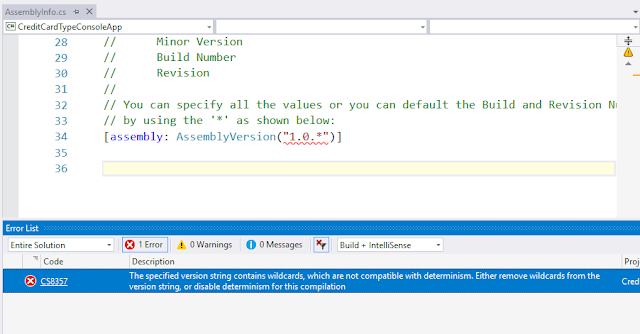
The specified version string contains wildcards, which are not compatible with determinism.
Image
With some versions of Visual studio when you try to make version auto number sometimes it get an error like : Error CS8357 The specified version string contains wildcards, which are not compatible with determinism. Either remove wildcards from the version string, or disable determinism for this compilation Solution : Unload Project from visual studio and edit .csproj file Or open .csproj solution file in editor. Search for tag and Change value from true to false Save file and reload project again inside Visual studio <propertygroup> <configuration condition=" '$(Configuration)' == '' ">Debug</configuration> <platform condition=" '$(Platform)' == '' ">AnyCPU</platform> <projectguid>{76602FA1-9AD8-4014-BA5D-2E9128C19AB2}</projectguid> <targetframeworkversion>v4.7</targetframeworkversion> <filealignment>512</filealignment> <a...
Get Credit Card Type

How to get C-card type, how to know the input card number is Visa or Master Card ? here the code for CreditCard.cs public class CreditCard { private string AmericanExpressPattern => @"^3[47][0-9]{13}$"; private string MasterCardPattern => @"^5[1-5][0-9]{14}$"; private string VisaCardPattern => @"^4[0-9]{12}(?:[0-9]{3})?$"; private string DinersClubCardPattern => @"^3(?:0[0-5]|[68][0-9])[0-9]{11}$"; private string EnRouteCardPattern => @"^(2014|2149)"; private string DiscoverCardPattern => @"^6(?:011|5[0-9]{2})[0-9]{12}$"; private string JcbCardPattern => @"^(?:2131|1800|35\d{3})\d{11}$"; private Dictionary CreditRegxs { get; set; } public CreditCard() { CreditRegxs = new Dictionary () { {"American Express",AmericanExpressPattern}, {"Mastercard",MasterCardPattern}, {"Visa...

Serialization File Error Could not load file or assembly mscorlib.XmlSerializers

When serializing an XML file, an error occurs in the following manner: XmlSerializer serializer= new XmlSerializer(typeof(MyType)); Errors such as : The assembly with display name 'mscorlib.XmlSerializers' failed to load in the 'LoadFrom' binding context of the AppDomain with ID 1. The cause of the failure was: System.IO.FileNotFoundException: Could not load file or assembly 'mscorlib.XmlSerializers, Version=4.0.0.0, Culture=neutral, PublicKeyToken=b77a5c561934e089' or one of its dependencies. The system cannot find the file specified. use the following line to solve it:  XmlSerializer lizer = XmlSerializer.FromTypes(new[] { typeof(MyType) })[0];

Error "The operation can not be performed Because the message Has Been changed"

Being of the email changes saved, then the execution of the mail Save () method, you may experience the error   "The operation can not be performed Because the message Has Been changed."  Especially if you go to edit multiple email. This is due to the object  Microsoft.Office.Interop.Outlook.UserProperty  that was not released.   So before the save is to be performed education System.Runtime.InteropServices.Marshal.ReleaseComObject (UserProperty). At this stage the previous post snippet becomes   public void AddCustomPropertyToMail (entryID string, string propertyName, string value) { Microsoft.Office.Interop.Outlook.MailItem mail = Globals.ThisAddIn.Application.Session.GetItemFromID (entryID) as Microsoft.Office.Interop.Outlook.MailItem; if (email! = Null) { Microsoft.Office.Interop.Outlook.UserProperty UserProperty = mail.UserProperties.Add (propertyName, Microsoft.Office.Interop.Outlook.OlUserPropertyType.olText); UserProperty.Val...

OCR text detection with google APIs C#

Image
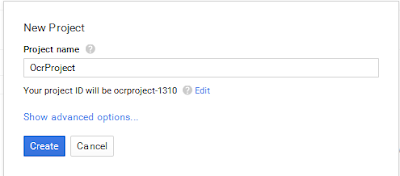
After searching more than 3 hrs to know how to implement text detection using google API i decided to write this post, hope it help c# developer to know how to use and implement Vision API, Source Code :  https://github.com/msm2020/OCR-google-APIs 1- Create server key on google console Go to http://console.developers.google.com/ and create new project or use existing project From Overview page enable vision API You need to create new bill information to use vision API, it's fully free for 1st 1000 request/ month you can check https://cloud.google.com/vision/docs/pricing After Enable Google Cloud Vision API go to Credentials page and create new server key Create key by fill all requested data and download Json file 2- Create Visual studio project I'll use vs 2015 and .NET framework 4.5 Add google Nuget packages : Google.Apis.Vision.v1 by right click on project and then manage nuget ...

How to set dynamically height/width of an external image in rdlc report?

It seems that there is no way to dynamically set the height and width of an external image used in rdlc report, but here a workaround to make it possible Add image to you Report On the image properties, set it to use External image source and use a report parameter to set which image to use On image, set "keep original size" Edit: You may also generate such "padding image" dynamically to allow different widths, for example: public void GenerateReport(int width, int height) { var image =Bitmap.FromFile("your image path"); //you can use stream or other way to get the image using (var g = Graphics.FromImage(image)) { g.Clear(Color.Transparent); g.FillRectangle(new SolidBrush(Color.Transparent), 0, 0, width, height); // here will change the size to fit in report } MemoryStream ms = new MemoryStream(); image.Save(ms, System.Drawing.Imaging.ImageFormat.Png); // and pa...

Compiler Error Message: CS0433: The type 'Microsoft.Reporting.WebForms.ReportDataSource' exists in both 'c:\WINDOWS\assembly\GAC_MSIL\Microsoft.Report

The solution to this problem need to go to web.config file and delete these four lines: <add assembly="Microsoft.ReportViewer.WebForms, Version=8.0.0.0, Culture=neutral, PublicKeyToken=B03F5F7F11D50A3A"/> <add assembly="Microsoft.ReportViewer.Common, Version=8.0.0.0, Culture=neutral, PublicKeyToken=B03F5F7F11D50A3A"/> <add assembly="Microsoft.ReportViewer.WebForms, Version=9.0.0.0, Culture=neutral, PublicKeyToken=B03F5F7F11D50A3A"/> <add assembly="Microsoft.ReportViewer.Common, Version=9.0.0.0, Culture=neutral, PublicKeyToken=B03F5F7F11D50A3A"/>

Can I escape a double quote in a verbatim string literal?

Use a double quote. ie @"this ""word"" is escaped";

Which Button was submit the form in page load event

The sender argument to the handler contains a reference to the control which raised the event. private void Button1_Click(object sender, EventArgs e) { Button theButton = (Button)sender; ... } In the Load event: Use Request's Form collection will contain a key/value for the submitting button, but not for the others. So you can do something like protected void Page_Load(object sender, EventArgs e) { Button theButton = null; if (Request.Form.AllKeys.Contains("button1")) theButton = button1; else if (Request.Form.AllKeys.Contains("button2")) theButton = button2; ... }

How to get jQuery version

use Console or write a jquery to get version: 1- jQuery.fn.jquery 2- $.fn.jquery; 3- jQuery().jquery; 4- $().jquery

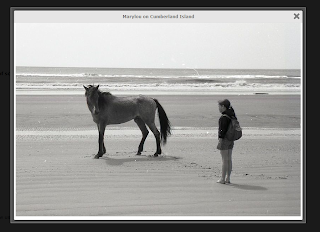
colorbox lightbox style with Close and title in top.

Image
To change style to bellow style: download code from here :            https://github.com/msm2020/colorbox/tree/master/example5

get submit button id in Page_Load

The sender argument to the handler contains a reference to the control which raised the event. private void MyClickEventHandler(object sender, EventArgs e) { Button theButton = (Button)sender; ... } Edit: Wait, in the Load event? That's a little tricker. One thing I can think of is this: The Request's Form collection will contain a key/value for the submitting button, but not for the others. So you can do something like: protected void Page_Load(object sender, EventArgs e) { Button theButton = null; if (Request.Form.AllKeys.Contains("button1")) theButton = button1; else if (Request.Form.AllKeys.Contains("button2")) theButton = button2; ... } Not very elegant, but you get the idea..

Escape an Underscore Like cause

if you search about Underscore this query will not get a true value Where Username Like '%_d' so you need to use : Where Username LIKE '%[_]d'

string contains in Jquery

Like this: if (str.indexOf("Yes") >= 0) Note that this is case-sensitive. If you want a case-insensitive search, you can write if (str.toLowerCase().indexOf("yes") >= 0) Or, if (/yes/i.test(str))

Operation must use an updateable query

One quite likely reason is that the user running the program doesn't have read-write access to the database file, especially if it is located in program files folder,make sure excel not mark as "Read Only" So check the directory and file permissions and moodify them if needed. You can also consider changing the location of the database file to another, more asily accessible folder.

Gridview RowDataBound - extract data from a field

Use DataItem of the GridViewRow instead of DataBinder.Eval to get the underlying datasource: protected void GridView1_RowDataBound(object sender, GridViewRowEventArgs e) { if (e.Row.RowType == DataControlRowType.DataRow && e.Row.RowState == DataControlRowState.Edit)) { DataRow row = ((DataRowView)e.Row.DataItem).Row; String name = row.Field ("Name"); // OR name = row[1]; // String is a reference type, so you just need to compare with null if(name != null){/* do something */} } }

Changing the color of a row in a GridView in ASP.NET

Change the color of a row depending on whether the Doctor is Active or Inactive protected void grdview_RowDataBound(object sender, GridViewRowEventArgs e) { { if (e.Row.RowType == DataControlRowType.DataRow) { if ((string.IsNullOrEmpty(e.Row.Cells[3].Text) != true) || (e.Row.Cells[3].Text != " ")) { Char result = Convert.ToInt32(e.Row.Cells[3].Text); if (result == ‘Y’) e.Row.BackColor = System.Drawing.Color.Aqua; else if (result ==’N’) e.Row.BackColor = System.Drawing.Color.Cornsilk; } } } } Change the Color of the cells depending on the Value of a column protected void grd_RowDataBound(object sender, GridViewRowEventArgs e) { { if (e.Row.RowType == DataControlRowType.DataRow) { if ((string.IsNullOrEmpty(e.Row.Cells[3].Text) != true) || (e.Row.Cells[3].Text != " ")) ...

Run A Macro When Worksheet Opens Excel

In the VBA editor, put the following code in the "This Workbook" sheet: Private Sub Workbook_Open() MsgBox "I just opened my workbook" End Sub then save the workbook, close it, and open it again to see if this is what you want.

check radio button is checked using JQuery

Given a group of radio buttons: <input type="radio" id="radio1" name="radioGroup" value="1"> <input type="radio" id="radio2" name="radioGroup" value="2"> You can test whether a specific one is checked using jQuery as follows: if ($("#radio1").prop("checked")) { // do something } // OR if ($("#radio1").is(":checked")) { // do something } // OR if you don't have ids set you can go by group name and value // (basically you need a selector that lets you specify the particular input) if ($("input[name='radioGroup'][value='1']").prop("checked"))

C# Crop white space from around the image

This code will crop the image based on all white and transparent pixels from around the image public static Bitmap CropWhiteSpace(Bitmap bmp) { int w = bmp.Width; int h = bmp.Height; int white = 0xffffff; Func allWhiteRow = r => { for (int i = 0; i allWhiteColumn = c => { for (int i = 0; i = 0; --row) { if (!allWhiteRow(row)) break; bottommost = row; } int leftmost = 0, rightmost = 0; for (int col = 0; col = 0; --col) { if (!allWhiteColumn(col)) break; rightmost = col; } if (rightmost == 0) rightmost = w; // As reached left if (bottommost == 0) bottommost = h; // As reached top. int croppedWidth = rightmost - leftmost; int croppedHeight = bottommost - topmost; if (croppedWidth == 0) // No border on left or right { leftmost = 0; croppedWidth = w; } if (croppedHeight == 0) // No border on top or bottom { topmost = 0; croppedHeight = h; } try { var target = new Bi...