Scenarios: -If you get the following errors: Could not load file or assembly Microsoft.ReportViewer.Common Could not load file or assembly Microsoft.ReportViewer. ProcessingObjectModel Server Error in '/' Application. Parser Error Description: An error occurred during the parsing of a resource required to service this request. Please review the following specific parse error details and modify your source file appropriately. Parser Error Message: Could not load file or assembly 'Microsoft.ReportViewer.WebForms, Version=11.0.0.0, Culture=neutral, PublicKeyToken=89845dcd8080cc91' or one of its dependencies. The system cannot find the file specified.
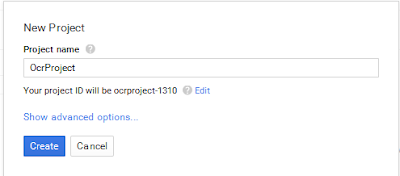
After searching more than 3 hrs to know how to implement text detection using google API i decided to write this post, hope it help c# developer to know how to use and implement Vision API, Source Code : https://github.com/msm2020/OCR-google-APIs 1- Create server key on google console Go to http://console.developers.google.com/ and create new project or use existing project From Overview page enable vision API You need to create new bill information to use vision API, it's fully free for 1st 1000 request/ month you can check https://cloud.google.com/vision/docs/pricing After Enable Google Cloud Vision API go to Credentials page and create new server key Create key by fill all requested data and download Json file 2- Create Visual studio project I'll use vs 2015 and .NET framework 4.5 Add google Nuget packages : Google.Apis.Vision.v1 by right click on project and then manage nuget ...
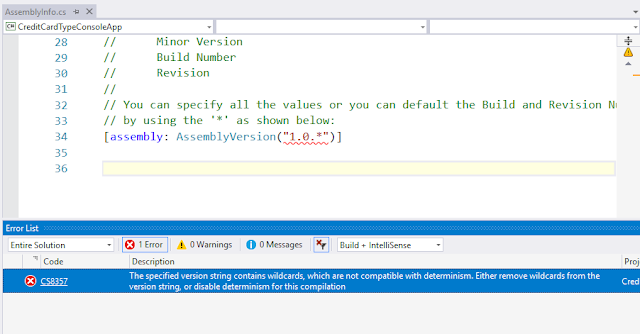
With some versions of Visual studio when you try to make version auto number sometimes it get an error like : Error CS8357 The specified version string contains wildcards, which are not compatible with determinism. Either remove wildcards from the version string, or disable determinism for this compilation Solution : Unload Project from visual studio and edit .csproj file Or open .csproj solution file in editor. Search for tag and Change value from true to false Save file and reload project again inside Visual studio <propertygroup> <configuration condition=" '$(Configuration)' == '' ">Debug</configuration> <platform condition=" '$(Platform)' == '' ">AnyCPU</platform> <projectguid>{76602FA1-9AD8-4014-BA5D-2E9128C19AB2}</projectguid> <targetframeworkversion>v4.7</targetframeworkversion> <filealignment>512</filealignment> <a...
Comments
Post a Comment