Posts

How to set dynamically height/width of an external image in rdlc report?

It seems that there is no way to dynamically set the height and width of an external image used in rdlc report, but here a workaround to make it possible Add image to you Report On the image properties, set it to use External image source and use a report parameter to set which image to use On image, set "keep original size" Edit: You may also generate such "padding image" dynamically to allow different widths, for example: public void GenerateReport(int width, int height) { var image =Bitmap.FromFile("your image path"); //you can use stream or other way to get the image using (var g = Graphics.FromImage(image)) { g.Clear(Color.Transparent); g.FillRectangle(new SolidBrush(Color.Transparent), 0, 0, width, height); // here will change the size to fit in report } MemoryStream ms = new MemoryStream(); image.Save(ms, System.Drawing.Imaging.ImageFormat.Png); // and pa...
Compiler Error Message: CS0433: The type 'Microsoft.Reporting.WebForms.ReportDataSource' exists in both 'c:\WINDOWS\assembly\GAC_MSIL\Microsoft.Report

The solution to this problem need to go to web.config file and delete these four lines: <add assembly="Microsoft.ReportViewer.WebForms, Version=8.0.0.0, Culture=neutral, PublicKeyToken=B03F5F7F11D50A3A"/> <add assembly="Microsoft.ReportViewer.Common, Version=8.0.0.0, Culture=neutral, PublicKeyToken=B03F5F7F11D50A3A"/> <add assembly="Microsoft.ReportViewer.WebForms, Version=9.0.0.0, Culture=neutral, PublicKeyToken=B03F5F7F11D50A3A"/> <add assembly="Microsoft.ReportViewer.Common, Version=9.0.0.0, Culture=neutral, PublicKeyToken=B03F5F7F11D50A3A"/>

Can I escape a double quote in a verbatim string literal?

Use a double quote. ie @"this ""word"" is escaped";

Which Button was submit the form in page load event

The sender argument to the handler contains a reference to the control which raised the event. private void Button1_Click(object sender, EventArgs e) { Button theButton = (Button)sender; ... } In the Load event: Use Request's Form collection will contain a key/value for the submitting button, but not for the others. So you can do something like protected void Page_Load(object sender, EventArgs e) { Button theButton = null; if (Request.Form.AllKeys.Contains("button1")) theButton = button1; else if (Request.Form.AllKeys.Contains("button2")) theButton = button2; ... }

How to get jQuery version

use Console or write a jquery to get version: 1- jQuery.fn.jquery 2- $.fn.jquery; 3- jQuery().jquery; 4- $().jquery

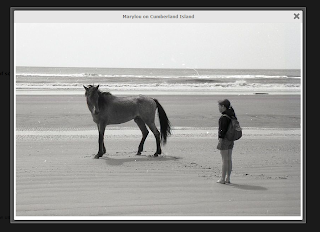
colorbox lightbox style with Close and title in top.

Image
To change style to bellow style: download code from here :            https://github.com/msm2020/colorbox/tree/master/example5

get submit button id in Page_Load

The sender argument to the handler contains a reference to the control which raised the event. private void MyClickEventHandler(object sender, EventArgs e) { Button theButton = (Button)sender; ... } Edit: Wait, in the Load event? That's a little tricker. One thing I can think of is this: The Request's Form collection will contain a key/value for the submitting button, but not for the others. So you can do something like: protected void Page_Load(object sender, EventArgs e) { Button theButton = null; if (Request.Form.AllKeys.Contains("button1")) theButton = button1; else if (Request.Form.AllKeys.Contains("button2")) theButton = button2; ... } Not very elegant, but you get the idea..